
Meta / TikTok
The Meta / TikTok section is the workspace for media buyers on the advertising platforms side. Here you connect Facebook and TikTok ad accounts to Adset.pro, see the ad structure (accounts → campaigns → ad sets → ads) along with spend, conversions, and ROI from the tracker, work with the creative library, and set up automatic comment cleaning under the ads.
The key idea of the section: the platform's spend and the tracker's income are summarized in one table. Adset.pro pulls spend, impressions, and clicks from the advertising APIs, while conversions and payouts are taken from its own tracking — and calculates profit and ROI for each ad without manual export from Ads Manager.
Section Articles
Managing Social Profiles and Connection Types — transports for Facebook and TikTok, creating and configuring a profile, token statuses, what to do when synchronization stops.
Setting Up Traffic Sources for Correct Mapping — which macros to map Facebook and TikTok to, so that spend matches traffic, and income and ROI are not empty.
Comment Cleaner: Profile Setup — automatic hiding and deleting of comments under ad posts, trial mode, log.
Sets of Comment Cleaner Rules — stop words, regular expressions, exceptions, system templates.
Agencies — directory of account suppliers, commission in spend, comparison of suppliers.
Accounts, Campaigns, Ad Sets, Ads: Tabular Data — four levels of advertising structure, metrics, filters, binding to tracker campaigns.
Creative Library — gallery of creatives with ROI for each, creative card, search for similar ones.
What the Section Consists Of
Menu Item | Purpose | Who Can Change |
|---|---|---|
Agencies | Directory of account suppliers: commission, model and payment terms, contacts. The commission is automatically added to the spend in the metric "Spend + commission $" | Team owner, team lead, tech buyer — view only |
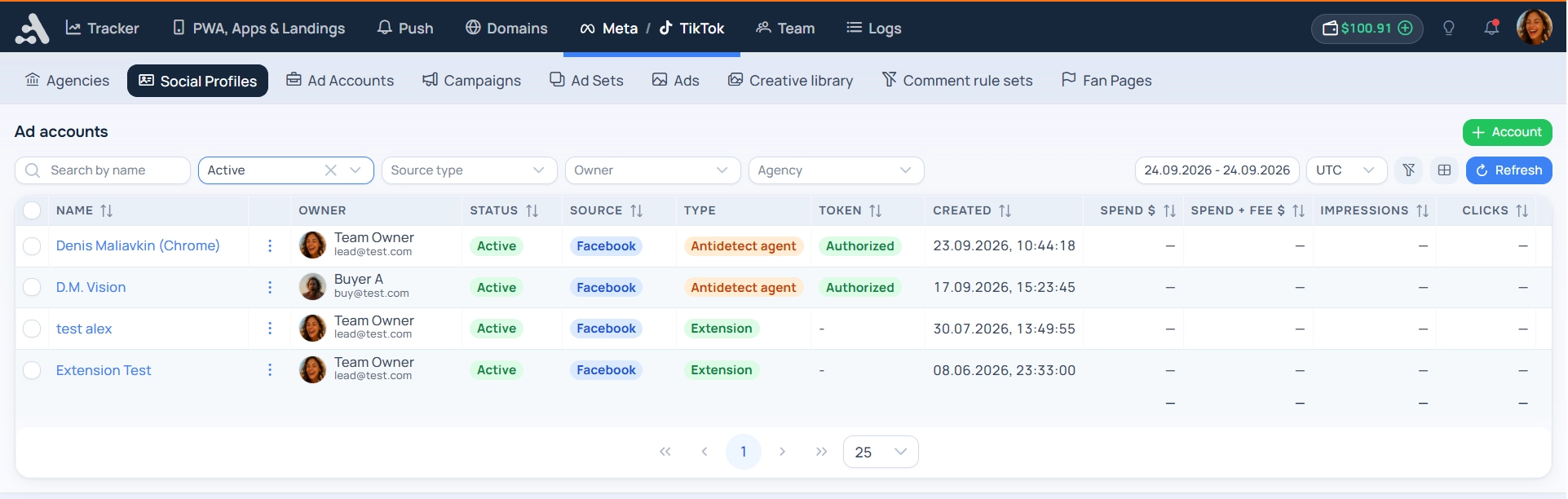
Social Profiles | Connections to platforms: method of communication (transport), token, proxy, synchronization interval, traffic source, comment cleaner settings | All roles. The buyer creates and sees only their profiles |
Accounts | Advertising accounts that your token has seen: status, currency, balance, spent, spend for the period | View only (data is synchronized) |
Campaigns / Ad Sets / Ads | Advertising structure with spend, tracker conversions, profit, and ROI. Drilling down from level to level while keeping filters | View only |
Creative Library | All images, videos, and ad texts in one place: where the creative was used, how much it brought, similar creatives | View only |
Facebook → Sets of Cleaner Rules | Stop words, regular expressions, and exceptions for automatic comment moderation | Team owner, team lead, tech buyer — selection of a ready-made set only |
Facebook → Fan Pages | Pages under which the cleaner operates: how many comments and actions in 30 days, access to the page. From here, the "Cleaner Log" opens | View only + manual actions with comments |
Getting Started
The order of connection — from organizational to data:
Agency (optional but recommended) — if you are buying accounts, create a supplier and specify their commission. Then the actual cost of traffic with markup will appear in the reports.
Social Profile — choose the platform and connection method, insert the token or install the extension, specify the traffic source and synchronization interval.
Traffic Source — map the platform macros to sub-parameters, otherwise the spend will not match the traffic, and conversions will not be linked to the ads.
Check the Tables — after the first synchronization, accounts, campaigns, ad sets, and ads are filled automatically. If the "Campaign (ours)" column says "Not linked" — the ad is not linked to the tracker campaign.
Comment Cleaner (for Facebook) — is enabled on the profile connected via a plugin or anti-detect agent. Start with trial mode.
What is Available for TikTok
TikTok connects with the same social profile and falls into the same tables: accounts (advertiser), campaigns, ad sets (ad groups), and ads, spend, impressions, and clicks are synchronized on schedule.
Differences from Facebook that are important to know:
Comment Cleaner for TikTok does not work — this is a Facebook functionality (Meta pages, posts, and comments).
Creative Library for TikTok is not filled — TikTok does not provide the identifier and preview of the creative through the API, so there are no images and videos for TikTok ads in the library.
There is no separate menu group for TikTok — TikTok profiles and their data live in the common screens of the section, filter by social profile.
What You Need to Know About the Data
Default period is today. All tables in the section have their own period selection and time zones. Today's figures for the platforms are preliminary and are clarified throughout the day.
Spend is stored with an accuracy of up to an hour for each ad, so any slices by period are calculated from one source and match between levels.
Data visibility depends on the role. The buyer sees only their profiles and their ads; the team lead — themselves and their subordinates; the team owner and tech see the entire team.