
Facebook Spend Sync via the Antidetect Agent (Spend Agent)
User guide: how to connect Facebook through the antidetect agent (connection method “Antidetect agent”) so that ad spend flows into Adset.pro automatically from your antidetect-browser profiles — AdsPower or Vision.
This is a separate way of pulling costs. The general preparation (social profile, macro mapping, linking ads to campaigns) is described in “Pulling Costs from Facebook” — it is required here too. Below is only what is specific to the agent.
What it is and when to choose it
The agent is an extension installed inside an antidetect-browser profile. It passes to Adset.pro the data required to access your ad account statistics, together with the profile proxy. After that Adset.pro’s server pulls the spend, querying Facebook through the profile proxy — from the same IP the buyer works from.
The key difference from the regular “Adset.pro Cost Sync” plugin (Chrome Web Store): there the browser itself performs the sync and an open Ads Manager tab is required for every run. Here the sync runs on the server on a schedule, and the browser profile is only needed so the agent can refresh access periodically.
“Cost Sync” plugin (Web Store) | Antidetect agent (this article) | |
|---|---|---|
Where it is installed | Regular Chrome, from the Chrome Web Store | An antidetect-browser profile (AdsPower / Vision), sideloaded |
Who pulls the data | The browser (an open Ads Manager tab is required) | The Adset.pro server, through the profile proxy |
Proxy | Not required (requests come from the browser) | Mandatory — the profile proxy; without it the sync does not run |
When to choose | You work from regular Chrome with an open Ads Manager tab | You work from antidetect profiles and need the sync to come from the profile IP |
What you will need
The AdsPower or Vision antidetect browser with a configured Facebook profile (logged in, with a working proxy).
A proxy on the profile is mandatory. The server queries Facebook only through the profile proxy — without it the sync is not performed.
The completed general setup from the main costs article: a Facebook social profile, FB macro mapping (
{{campaign.id}}/{{adset.id}}/{{ad.id}}) in the traffic source, and a track link in the creative — otherwise spend will appear in the Meta section but will not be attached to your campaigns.Binding rule: 1 profile = 1 social profile = 1 agent token. A single token cannot be used for several profiles.
Step 1. Connect in Adset.pro and issue a token
Open Meta → Social profiles and create or edit a Facebook profile.
Set the connection method to “Antidetect agent”.
Save the profile — the token is generated for an already saved profile.
In the agent block click “Generate token” and copy it.
The token is shown only once. Re-issuing invalidates the previous one. Keep it secret.
Step 2. Install the agent into the antidetect-browser profile
The agent is not distributed via the Chrome Web Store — it is a sideloaded extension. Get the agent archive from your manager.
Obtain the agent archive and unpack it into a separate folder.
Install the unpacked extension into the required antidetect-browser profile (loading an “unpacked” extension). The exact path depends on the antidetect version:
AdsPower: in the profile settings / extensions section, add the local extension from the unpacked folder, then start the profile.
Vision: in the profile’s extensions section, add the unpacked agent folder and start the profile.
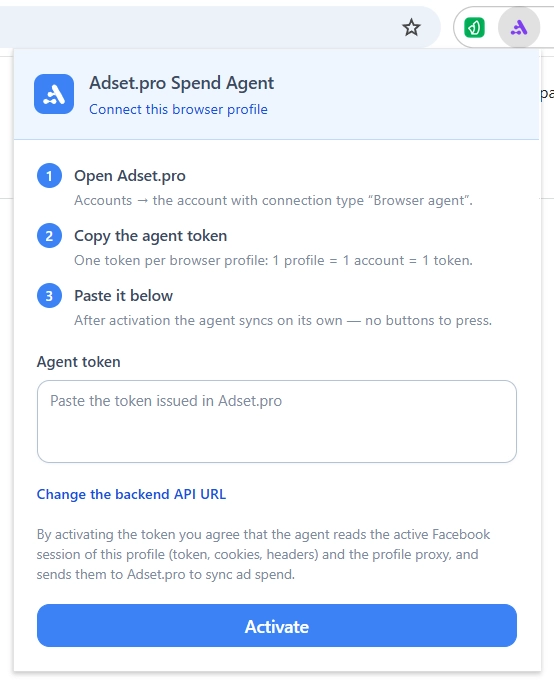
Open the profile and launch the agent (the extension icon in the browser toolbar).
Step 3. Enter the token and select the antidetect browser
On the agent’s start screen paste the copied token and click “Apply”. The agent validates the token and shows the linked user, team and social profile. Saving the token confirms your consent to connecting the profile to Adset.pro.
Open Settings (gear icon) → the “Antidetect browser” block and choose the browser type.
AdsPower
Antidetect type — AdsPower.
The Local API address is pre-filled by default — no need to change it. If you do change it, use
127.0.0.1rather thanlocal.adspower.net: the domain address goes through the profile proxy and returns “403 Access Denied”.Local API key — required only if Local API access verification is enabled in AdsPower (AdsPower → Settings → Local API). If it is disabled, leave the field empty.
Vision
Antidetect type — Vision.
The API address is pre-filled by default — no need to change it.
X-Token — mandatory. Copy it in Vision: Settings → X-Token — and paste it into the key field. Without the X-Token the agent will not see Vision profiles.
Only open profiles are synced — that is, the profile the agent runs in.
If you do not use an antidetect browser (plain Chrome), choose “None (regular Chrome)”: the agent will detect the profile automatically and take the proxy from the browser settings or from manual input.
Step 4. The profile proxy
The proxy is mandatory. The agent picks it up from the profile settings automatically.
You can check which proxy will be sent to the server on the agent’s profiles screen.
If the proxy login and password were not picked up automatically, enter them manually in the agent settings — otherwise the server will not be able to pass the proxy.
Auto-sync and how the sync works
In the settings enable Auto-sync and choose an interval: 1, 5, 15, 30 minutes or 1 hour. The agent refreshes access periodically — while the browser profile is open.
The spend collection itself is performed by the Adset.pro server on a schedule, through the profile proxy. This keeps working even after the browser is closed — as long as access remains valid.
Adset.pro selects the date window automatically: the current day and several preceding ones, so that Facebook’s backdated corrections are picked up. Today’s Facebook figures are not final and are refined during the day.
Where to see the spend
Meta → Ad accounts / Campaigns / Ad sets / Ads — spend, impressions, clicks, CPC, CTR, CPM. The “Social profile” filter above the tables limits the data to a single profile.
Tracker campaign reports — spend is added to the traffic cost, provided the FB macro mapping is done and ads are linked via a track link (see the main costs article).
Agent settings
Token — shown masked. The “Replace” button lets you paste a new token after re-issuing it in Adset.pro.
Auto-sync and its interval (1/5/15/30/60 minutes).
Antidetect browser, API address and key (see Step 3), plus the manual proxy and the profile id for the no-antidetect mode.
Language (Russian/English/Ukrainian) and theme (system/light/dark).
Frequently asked questions
The sync does not run: “profile proxy not detected”.
The proxy is mandatory. Check that the profile has a proxy configured, and if the login and password were not picked up, enter them manually in the agent settings.
Vision does not show any profiles.
The X-Token is missing or incorrect. Copy the current X-Token from Vision → Settings and paste it into the key field. Only open profiles are synced.
There are several active profiles.
One token is bound to one profile (1 profile = 1 social profile = 1 token). Select the required profile in the agent — auto-sync will then use only that one. For another profile create a separate social profile and token.
Spend appears in the Meta tables but not in the campaign report.
The FB macro mapping in the traffic source is missing, or the ad is not linked to your campaign via a track link. See the “General setup” section of the main costs article.
Auto-sync does not fire.
The agent refreshes access only while the browser profile is open. Check that the profile is not closed between runs and that the auto-sync toggle is enabled. The minimum interval is 1 minute.
Facebook and Adset.pro figures do not match to the cent.
This is normal: Facebook refines recent figures retroactively, and the sync runs with an overlap. The totals converge as the data matures.
Token security
The agent token is bound to a specific social profile and user. Re-issuing invalidates the previous one.
Keep the token secret: do not publish it in open chats or repositories.
If the profile owner changes or the user is deactivated, the token stops working.