
Comment Cleaner: Settings on Profile
Comment Cleaner automatically hides or deletes comments under your ads on Facebook: spam with links, attempts to lure into messengers, scam accusations, garbage from bots. It works with the session of the advertising profile itself — just like if you were cleaning comments manually.
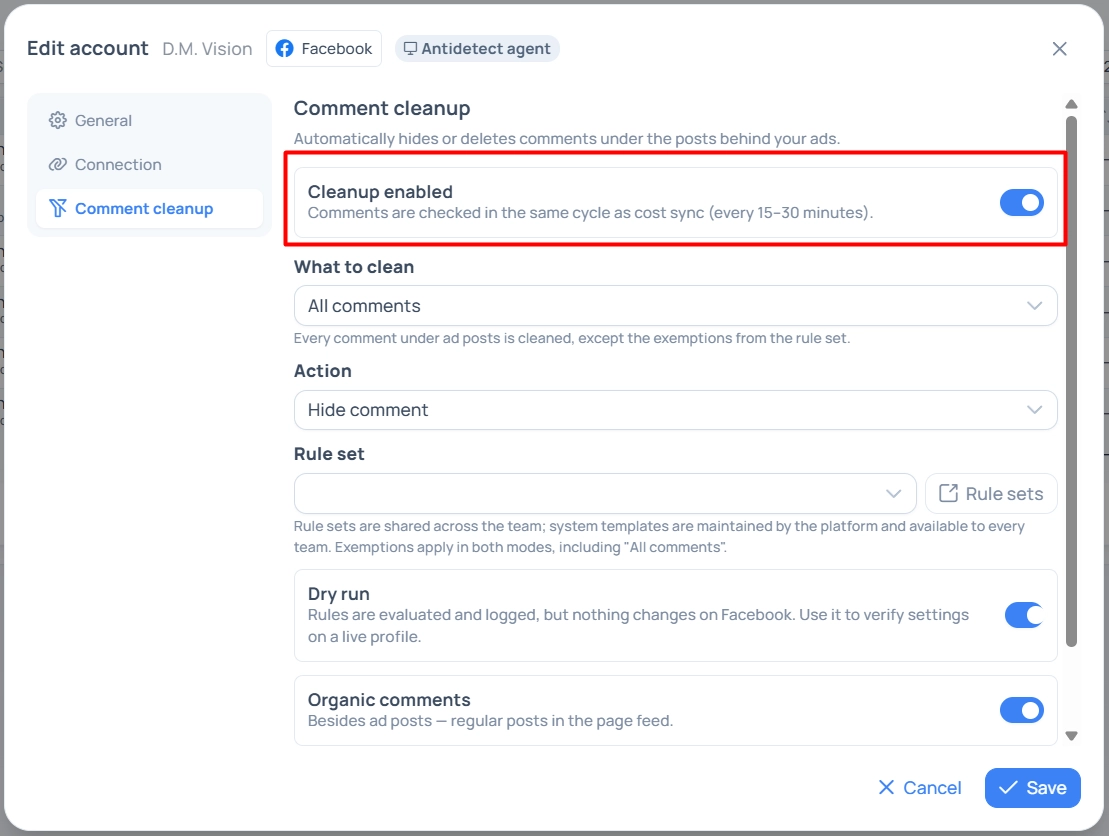
It is configured on a specific profile: Meta / TikTok → Social Profiles → profile card → “Comment Cleaner” tab.
When the tab is available
The cleaner works only for Facebook and only if the profile is connected via browser plugin or via anti-detect agent. There is no tab for Dev token and TikTok: these transports do not have a page session from which comments can be hidden.
Two more conditions:
the profile must be already saved — for a new profile, the tab shows a hint “First save the profile”;
for the plugin, the extension version must be at least 0.6.0 — the cleaner does not start on older versions.
If the tab is present but actions are not performed, check with the platform administrator whether the function is enabled globally.
Settings
Setting | Values | Default |
|---|---|---|
Cleaner enabled | Main toggle of the profile | Disabled |
What to clean | All comments — everything is cleaned except for the exceptions of the set. Only by set rules — only those that match the rules are cleaned | All comments |
Action | Hide — the comment is visible only to the author and their friends, it can be restored. Delete — irreversible | Hide |
Rule set | System template of the platform or your team's set | Default team set |
Trial mode | Rules are counted and written to the log, but nothing changes in Facebook | Enabled |
Organic comments | Whether to clean regular posts from the page feed, not just ad posts | Disabled |
Settings are saved along with the profile and applied from the next cycle.
How it works
The cleaner starts in the same cycle as expense synchronization — approximately every 15–30 minutes. In one pass, the system:
collects your ad posts (and feed posts if organic is enabled) from the pages accessible to the profile;
retrieves new comments under them;
checks each comment against the selected rule set;
queues matches for hiding or deletion and performs actions on behalf of the profile.
Three rules that always apply, regardless of settings:
Comments from the page itself are never touched — your responses under posts are safe.
Exceptions from the set are stronger than rules and work even in “All comments” mode: the author or phrase from the whitelist will not be hidden.
Posts without new comments are checked less frequently — the system does not waste Facebook limits on “dead” posts.
Recommended implementation order
Enable the cleaner, leaving trial mode. Choose a rule set.
After a few cycles, open the Cleaner Log and see what the system would have done. Pay attention to lines where a rule was triggered, but the comment is actually normal.
Adjust the set: remove overly broad stop words, add the author or phrase to exceptions.
When the log looks correct — turn off trial mode.
Enable the “Delete” action only after you are sure of the quality of the rules: deletion is irreversible, hiding is not.
Last run
At the bottom of the tab, the result of the last run is shown: date, marked “trial” if it was trial, and four counters — Comments (viewed), Matched (rules triggered), Actions (hidden or deleted), Errors. If the cleaner has not run yet, it is stated as such.
A large gap between “Matched” and “Actions” means that actions did not go through: either trial mode is enabled, or cycle limits were triggered, or Facebook rejected — check the log.
Pause after errors
If Facebook starts to reject actions en masse, the cleaner automatically goes on pause and shows the banner “Cleaner paused until …: protection triggered after Facebook errors”. This is to protect the account from blocking.
The pause is lifted automatically after the time expires; it can be lifted earlier with the “Resume” button in the cleaner log — but first, it is worth understanding the reason: most often, it is a stale profile session or loss of access to the page.
Where to see the result
Screen | What it shows | Where to open |
|---|---|---|
Profile tab | Summary of the last run | Profile card |
Fan Pages | Pages the cleaner works with: comments and actions for 30 days, number of posts and ads, subscribers, when the page was last seen, type of access | Meta / TikTok → Facebook → Fan Pages |
Cleaner log | Each action line by line | From the Fan Pages screen |

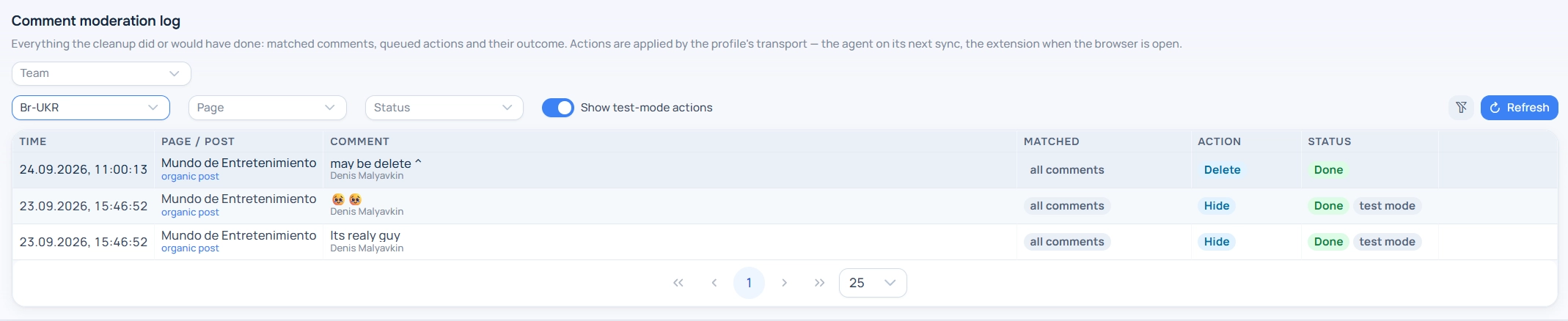
Cleaner log
The log is a line-by-line history: Time, Page / post, text comment, what triggered (for example, “link”, “stop word: …”, “only emoji”, “all comments”) and action with status: Queued, Executing, Completed, Error, Skipped.
From the log, you can act manually: “Restore comment” (undo hiding), “Hide comment”, “Delete comment”. Manual actions are performed even in trial mode — this is done intentionally so that you can tidy up while the rules are still being checked.
The toggle “Show trial” adds trial run lines to the list — what the system would have done with trial mode turned off.
Storage periods
Comment texts are stored for 60 days, then deleted from Adset.pro. This does not affect the comments themselves in Facebook.
Action log is saved and not cleared over time — the history of hiding and deletions can be retrieved later.
Access rights
The cleaner settings can be changed by anyone who can edit the profile: buyer — on their profiles, team lead — on their own and subordinates, team owner and techs — across the entire team. The log and manual actions are available to all roles within their visibility. Rules and sets are configured separately — see “Comment Cleaner Rule Sets”.
Frequently asked questions
Comments are not cleaned, although everything is enabled
Check in order: is trial mode enabled; is the profile token authorized (on the “Connection” tab); is the cleaner paused; does the profile have access to the page (Fan Pages screen); for the plugin — extension version 0.6.0 and above and an open logged-in Facebook tab.
The cleaner deleted the necessary comment
Deletion is irreversible — the comment cannot be restored either from Adset.pro or from Facebook. Therefore, by default, it is set to “Hide”: hiding can be undone with the “Restore comment” button in the log. Add the author or phrase to the exceptions of the set to prevent this from happening again.
Why are comments under regular posts of the page being cleaned?
The toggle “Organic comments” is enabled. Turn it off if you only need to work with ad posts.
Can comments be cleaned in TikTok?
No. The cleaner works only with Facebook.