
Setting Up Traffic Sources for Correct Mapping
Adset.pro receives expenses from Facebook and TikTok for ads, and clicks and conversions from its own tracking. To correlate one with the other, a common axis is needed: campaign, ad set, and ad identifiers must come along with the click. This is handled by the macro mapping in the traffic source.
This is the most common source of problems in the Meta / TikTok section: the profile is connected, expenses are visible, but income and ROI are empty. Almost always, the reason lies here.
Where to configure: Tracker → Traffic Sources → source card → "Parameters" tab.
Required Macros
What needs to be passed | TikTok | Why | |
|---|---|---|---|
Campaign ID |
|
| Tracker metrics at the campaign level |
Ad Set ID |
|
| Tracker metrics at the ad set level |
Ad ID |
|
| The most important. Without it, income and ROI in "Ads" and "Creative Library" will be empty |
Note for TikTok: __AID__ is the Ad Group ID, meaning our ad set, not the ad account. The ad is designated by the macro __CID__. The macro __CRID__ is not recognized by the system — if you encounter such an example, it is an error: the axis cannot be resolved on it.
It is recommended to map all three macros. Each missed level is a level where you will not see either income or ROI.
Recommended Layout
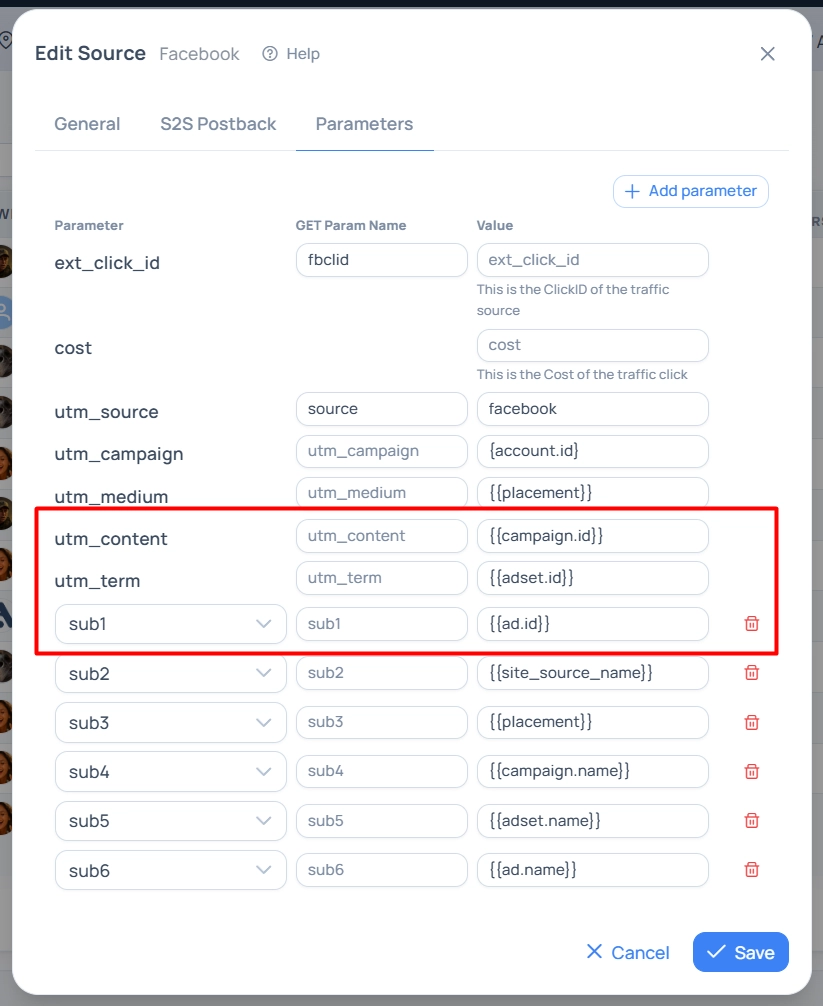
Slots are chosen freely, but there is a convention that the platform adheres to — it is also used by templates and the AI assistant:
Parameter | Value (Facebook) | What it is |
|---|---|---|
|
| Placement |
|
| Campaign ID |
|
| Ad Set ID |
|
| Ad ID |
|
| Placement site |
|
| Names — convenient for reading reports without cross-referencing with the cabinet |
For TikTok similarly: Campaign ID, Group ID, and Ad ID in the same slots, and names are passed with the macros __CAMPAIGN_NAME__, __AID_NAME__, __CID_NAME__.
If you add a source from a template, the required macros are already set — check them and save. Note that applying a template completely replaces the set of source parameters.
Three Rules to Understand
1. The GET parameter name can be changed — it is safe
In the "GET parameter" column, you specify how the parameter will be named in the link. The value always goes into the column of its slot: if sub1 is named creative, the data will still be in sub1 in the statistics. Renaming is needed for masking links and does not break the analytics.
2. One macro — one slot
If the same macro is specified in several parameters, only the first one in order is considered (first utm parameters, then sub1…sub10), the other copies are dead. The danger is that the platform may substitute the value into the "dead" slot — and the axis will not resolve, the section will appear empty. The platform warns about such duplicates directly in the source form.
3. The system accepts only real IDs
A valid identifier is considered a string of digits only, at least 5 characters long. This is protection against situations where the platform did not substitute the macro and the text {{ad.id}} or __CID__ itself came in the link. Such clicks do not participate in the binding — externally, it looks like "configured, but not working".
Hint in the Source Form
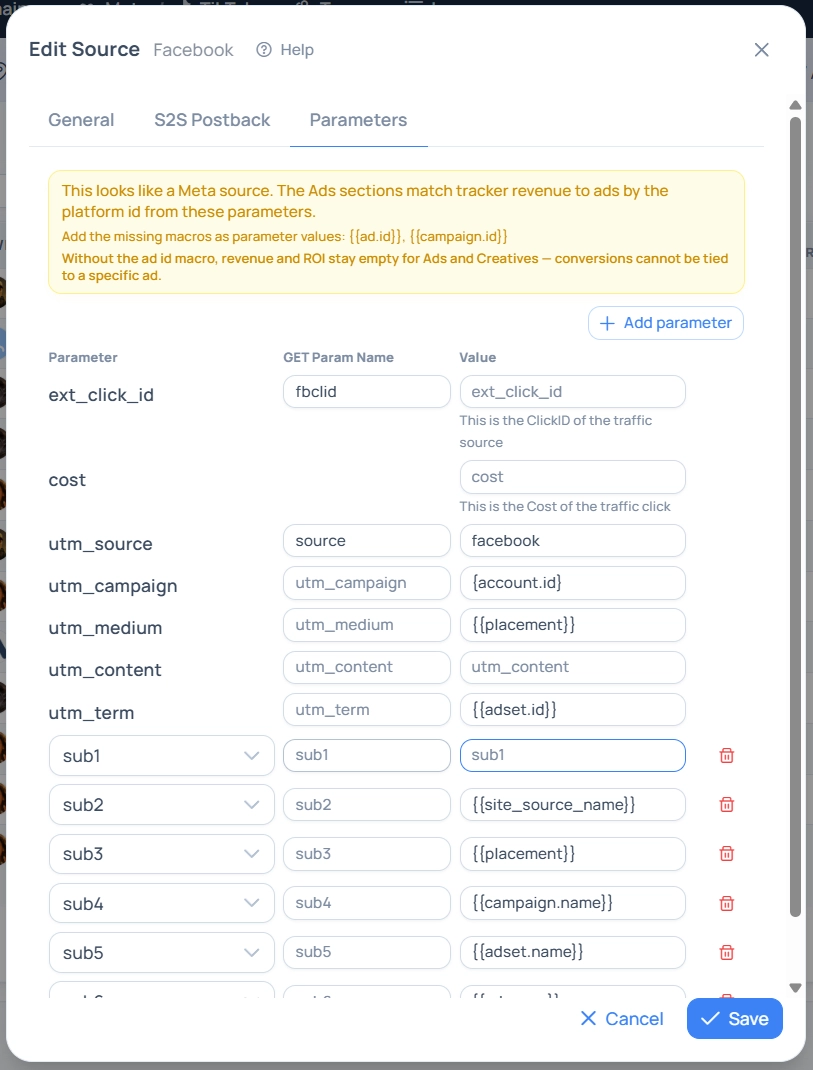
On the "Parameters" tab, the platform analyzes your mapping and shows a banner: "Looks like a Meta source. The Ads sections link tracker income to ads by the platform ID from these parameters". If something is missing, the banner directly names the problem:
_"Add missing macros to parameter values: …"
_"Without the ad ID macro, income and ROI will remain empty in Ads and Creatives — conversions have nothing to bind to"
_"Macro … is specified in several slots … — only … is considered, the others are dead"
What Breaks with Incorrect Mapping
What is set up | Consequence |
|---|---|
No id macros | Expenses are visible in the Meta / TikTok section tables, but do not appear in the tracker reports at all — the cost of traffic by campaign will remain without advertising costs |
There is | At the campaign level, tracker metrics are present, but in "Ads" and "Creative Library" income and ROI are empty |
Macro in a "dead" duplicate slot | Looks like a completely unconfigured mapping: no data, although the macro is present in the form |
Macro specified, but the platform does not substitute it | The text of the macro comes into the parameter, clicks are discarded |
How to Check if Everything Works
Attribution Banner. Open Meta / TikTok → Ads. If it says "Partial data: N % of tracker income linked to ads" at the top with a list of sources without the ad ID macro — the mapping is incomplete. The "Configure" button leads directly to the sources.
"Campaign (ours)" Column. On the "Ads" screen, the value "Not linked" means that the ad is not matched with the tracker campaign.
Live Click. Go through your ad and check in the click log that numerical IDs came in the parameters, not the text of the macros.
Income in "Ads". If FTD and income are coming from ads — the axis works.
Data does not appear instantly: conversions are recalculated in the analytics showcase approximately every 15 minutes, and expenses are pulled according to the profile interval.
Source Setup Checklist
The source is specified in the social profile card.
All three id macros of the required platform are mapped, each — in exactly one slot.
The same macros are in the clickable link of the ad — in the cabinet, not just in the source.
The creative uses the Adset.pro tracking link so that the ad is linked to the campaign.
The hint banner in the source form does not show warnings.
After 15–30 minutes from the first clicks, conversions appeared in the section.
General information about sources, their parameters, and postbacks is in the article "Traffic Sources (Sources)".