
Agencies
Agency in Adset.pro is a provider of advertising accounts: an agency, reseller, or partner from whom you obtain Facebook and TikTok accounts. The directory serves two purposes: it stores the working conditions (commission, payout model and terms, contacts) and automatically adds the commission to the expense, so you see the real cost of traffic, not just the platform's raw spend.
Screen: menu Meta / TikTok → Agencies (/ads/team-agency).
Why create an agency
Real cost of traffic. The specified commission is applied to the expense:
expense × (1 + commission ÷ 100). The result is visible in a separate metric “Exp. + comm. $” — both in the agency table and in the tables of accounts, campaigns, ad sets, and ads.Comparison of providers. In the agency table for the selected period, you can see how much each provider has spent: expense, expense with commission, impressions, clicks, CPC, CPM, CTR.
Order in accounts. From the agency row, you can open a list of its social profiles with one click.
The agency is a team-wide entity: it belongs to the team, not to a specific buyer. The connection to advertising is built through social profiles — the agency is specified in the social profile card, and the profile brings in accounts and expenses.
How to create an agency
Open Meta / TikTok → Agencies and click the “Agency” button.
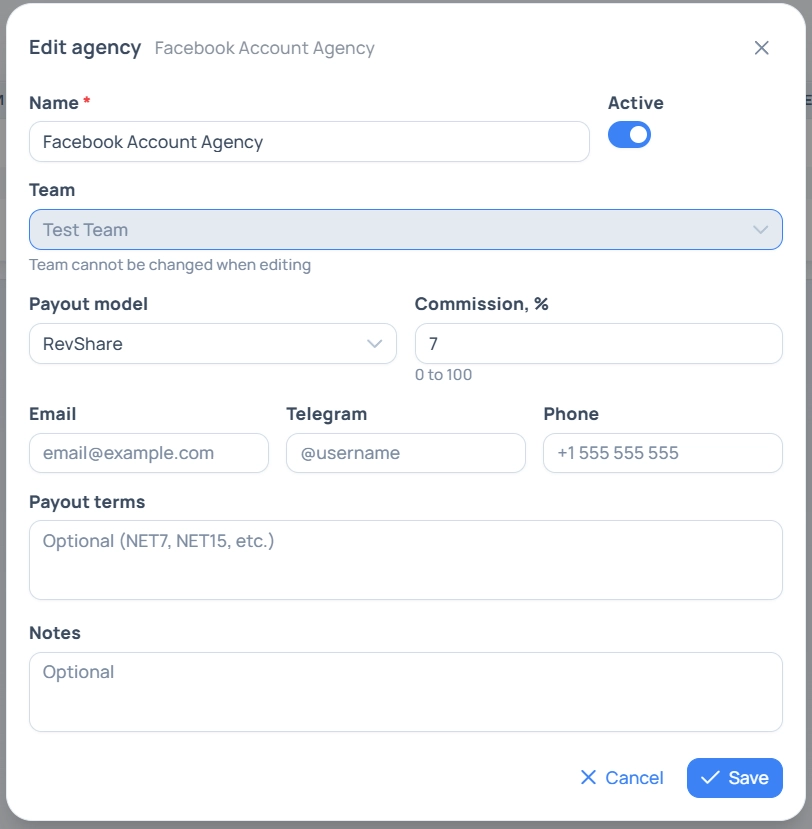
Fill out the card and save.
Field | What to specify | Required |
|---|---|---|
Name | The name of the provider as you refer to it in work. Must be unique within the team | Yes |
Team | This field is visible only to the platform administrator. The team cannot be changed when editing | — |
Payout model | RevShare, Fixed, or Hybrid. Reference field: does not affect calculations, used for filtering and accounting | Yes, default is RevShare |
Commission, % | From 0 to 100. The only field that affects the figures in reports. Default is 0 | Yes |
Email / Telegram / Phone | Manager's contacts — so you don't have to search for them in correspondence when the account is down | No |
Payout terms | Free text: NET7, NET15, prepayment, etc. | No |
Notes | Any details: limits, conditions for account replacement, agreements | No |
Agency table
By default, only active agencies are displayed, sorted by creation date, metric period — today.
Column | What it shows |
|---|---|
Name | Link to the list of social profiles of this agency |
Payouts | Payout model from the card |
Commission % | Markup percentage on expense |
Status | Active / Inactive |
Created | Date added to the directory |
Team | For platform administrator only |
The block “Expense metrics” for the selected period: Expense $, Exp. + comm. $, Impressions, Clicks, CPC $, CPM $, CTR %. Totals for all rows are displayed in the bottom row of the table. CPC, CPM, and CTR are calculated from expense, impressions, and clicks — sorting by them is not available, sort by basic metrics.
Filters: search by name, Status, Payout model, period selection and time zones, and for the administrator — also Team. The set and order of columns can be configured with the column selection button and are remembered in the browser.

Actions with the row
Edit — opens the agency card.
Accounts — goes to “Social Profiles,” already filtered by this agency.
Delete — actually deactivation: the agency stops being offered in lists, but the history of expenses and connections with profiles is preserved. It can be restored by removing the “Active” filter and turning the status back on. There is no complete deletion of agencies in the system.
Several agencies can be deactivated at once: check the rows with checkboxes and select an action from the menu above the table.
Access rights
Role | What is available |
|---|---|
Team owner, team lead, tech | Full access: creation, editing, deactivation, expense metrics by agencies |
Buyer | View the list of agencies and their profiles. Cannot create or edit agencies; the summary expense by agency is not shown to the buyer — otherwise, they would see the costs of colleagues |
Platform administrator | All teams, team selection when creating |
Frequently asked questions
The commission has changed — what will happen to the old data?
The commission is applied at the moment of report generation, not recorded in the expense history. After changing the percentage, the metric “Exp. + comm. $” will be recalculated at the new rate for all periods, including past ones. If you need to preserve historical costs — create a new agency with the new rate and switch the profiles to it.
Why does the agency's expense not match the sum of the accounts?
The agency table only includes the expenses of those social profiles that have this agency specified in the card. A profile without an agency is accounted for in the general tables but not in the agency breakdown.
Can an agency be created for a specific buyer?
No. The agency belongs to the team as a whole. The division by people occurs at the level of social profiles: each profile has an owner, and the buyer only sees their own.