
Cloudflare Accounts
What is a Cloudflare account?
A Cloudflare account is needed to manage DNS records and NS servers. When registering a domain, the system automatically updates DNS in Cloudflare.
Adding a Cloudflare account
Go to Domains → Cloudflare Accounts
Click Add
Fill in the fields
How to obtain Cloudflare API data
Option 1 (recommended): API Token
Log in to Cloudflare
Go to My Profile → API Tokens
Click Create Token
Select the Edit zone DNS template
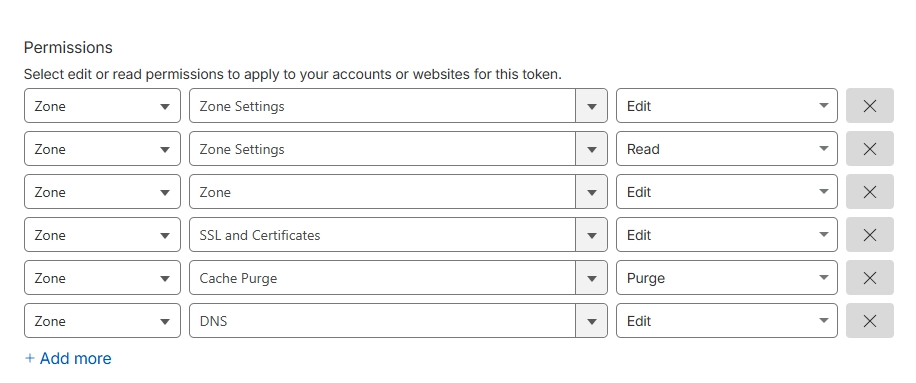
Set permissions:
Zone → DNS → Edit
Zone → Zone → Edit
Zone → Zone Settings → Read
Zone → Zone Settings → Edit
Zone → SSL and Certificates → Edit
Zone → Cache Purge → Purge
Grant permission to all zones
Zone Resources → Include → your zones or "All zones"
Click Create Token
Copy the token and paste it into Account Token
Option 2: Global API Key
In My Profile → API Tokens
In the Global API Key section, click View
Confirm your identity
Copy the key and paste it into Account Token
Your email is used as Account ID
Managing Cloudflare accounts
Status: shows whether the account is active
Edit: edit icon
Deactivate: Inactive
Delete: delete account